اپنی ریل، سبق یا کاروباری اعلان کا متن لکھ لیا ہے؟ جادو وائس (Jadoo Voice) کی ذاتی ایپ بنانے کے لیے اب اس گائیڈ میں 2 پرامپٹس ہیں: ایک میٹا میوز (Meta Muse) کے لیے اور دوسرا گوگل جیمنائی کینوس (Google Gemini Canvas) کے لیے۔ اپنے دستیاب پلیٹ فارم کا پرامپٹ کاپی کریں، ایپ بنوائیں اور اپنی جیمنائی API کی تیار شدہ ایپ میں درج کریں۔ کی چیٹ میں نہ بھیجیں۔
جیمنائی والے پرامپٹ میں وائس اوور کے ساتھ اردو کیپشنز والی عمودی ویڈیو بنانے کی ہدایات بھی شامل ہیں۔ اس میں آپ کی آڈیو کے ساتھ الفاظ اور آواز کی لہریں دکھائی دیتی ہیں۔ ویڈیو ایکسپورٹ تجرباتی ہے اور اس کا چلنا آپ کے براؤزر اور کینوس کی اجازتوں پر منحصر ہے۔
پہلی کوشش میں صرف 2 یا 3 جملوں کی آواز بنائیں۔ آڈیو چلنے لگے تو متن سامنے رکھ کر سنیں: نام درست پڑھا گیا؟ کوئی لفظ چھوٹا تو نہیں؟ آخری جملہ مکمل ہے؟ یہی چھوٹا تجربہ بتائے گا کہ آپ پورا اسکرپٹ بنانے کے لیے تیار ہیں یا پہلے سیٹنگ بدلنی ہے۔
اسے کاپی کرکے اپنے میوز کی نئی چیٹ میں دیں؛ میوز آپ کے لیے جادو وائس کا آرٹیفیکٹ بنائے گا۔ اپنی API کی اس پرامپٹ میں شامل نہ کریں۔
یہ پرامپٹ اپنے جیمنائی کی نئی چیٹ میں Canvas منتخب کرکے دیں۔ ایپ بننے کے بعد اپنی کی اس کے پہلے حصے میں درج کریں۔
پہلے اپنا پلیٹ فارم چنیں
میوز میں ایپ ایک آرٹیفیکٹ کی صورت میں بنتی ہے؛ جیمنائی میں یہی کام کینوس میں کیا جاتا ہے۔ دونوں صورتوں میں آپ اپنے اکاؤنٹ میں اپنی ایپ بنواتے ہیں۔ پہلے سے جادو وائس بنا چکے ہیں تو اسی ایپ کو کھول کر مرحلہ 2 سے آگے بڑھیں۔ پہلی بار بنانے والے نیچے اپنا طریقہ منتخب کریں۔
آپ کو منتخب پلیٹ فارم تک رسائی، اپنا گوگل اکاؤنٹ اور انٹرنیٹ چاہیے۔ API کی بنانے کے لیے گوگل اے آئی اسٹوڈیو (Google AI Studio) استعمال ہوگا۔ اس کی دستیاب علاقوں کی فہرست میں پاکستان شامل ہے؛ استعمال کے لیے عمر کم از کم 18 سال ہونا ضروری ہے۔
1۔ اپنے منتخب پلیٹ فارم میں ایپ بنائیں
میوز میں جادو وائس کا آرٹیفیکٹ بنائیں
اپنی میوز ایپ کھولیں، نئی چیٹ شروع کریں اور اوپر دیے گئے بٹن سے مکمل ماسٹر پرامپٹ کاپی کریں۔ اسے نئی چیٹ میں چسپاں کریں۔ اس میں ایپ کی شکل، اردو انٹرفیس، آڈیو بنانے اور فائل محفوظ کرنے کی تمام ضروریات درج ہیں۔
پرامپٹ بھیج کر میوز سے کہیں: «جادو وائس کو ایسا آرٹیفیکٹ بنائیں جسے میں یہیں میوز میں چلا سکوں۔» آرٹیفیکٹ تیار ہو تو اسے میوز کے اندر کھولیں۔ اس میں یہ چیزیں دیکھیں: اردو/English کا انتخاب، Gemini کی کا خانہ، متن لکھنے کی جگہ، آواز کا انتخاب اور آڈیو کا پلیئر۔ کوئی حصہ غائب ہو تو اسی چیٹ میں اس کی نشاندہی کریں۔ مثال کے طور پر: «متن کا خانہ فون پر کٹ رہا ہے؛ اسے درست کریں اور اردو دائیں سے بائیں دکھائیں۔»
پاکستان میں میوز کی دستیابی کی تصدیق نہیں ملی۔ میٹا کے 23 اکتوبر کے اعلان میں جاپان کی توسیع بیان ہوئی ہے۔ یہ طریقہ ان قارئین کے لیے ہے جن کے اپنے اکاؤنٹ میں میوز دستیاب ہے۔
ماڈل کی ضروری اپڈیٹ: اصل پی ڈی ایف میں gemini-2.5-flash-preview-tts درج ہے۔ گوگل کے بندش کے شیڈول میں اس کے لیے 17 نومبر 2026 ممکنہ ابتدائی تاریخ درج ہے، اس لیے نئے پرامپٹ میں موجودہ TTS ماڈل کے مطابق ایپ بنانے کی ہدایت شامل ہے۔ پرانی ایپ میں صرف ماڈل کا نام بدلنا کافی نہ ہو؛ ایجنٹ سے درخواست اور آڈیو پراسیسنگ بھی اپڈیٹ کروائیں۔
جیمنائی استعمال کرتے ہیں تو کینوس سے بنائیں
کمپیوٹر کے براؤزر میں یہ طریقہ اختیار کریں:
- جیمنائی کھولیں اور اپنے اکاؤنٹ میں سائن اِن کریں۔ نئی چیٹ شروع کریں۔
- لکھنے کے خانے کے نیچے Add Files کا مینو کھول کر Canvas منتخب کریں۔ یہ ترتیب گوگل کی آفیشل کینوس گائیڈ میں دی گئی ہے۔
- اوپر «جیمنائی کا پرامپٹ کاپی کریں» دبائیں، مکمل پرامپٹ چیٹ میں پیسٹ کریں اور بھیج دیں۔ اپنی API کی اس متن میں شامل نہ کریں۔
- ایپ کا پیش منظر بنے تو اس کے 5 حصے دیکھیں: کی، متن، آواز اور انداز، آڈیو بنانے کی پیش رفت، پھر نتیجہ اور ویڈیو۔ صرف کوڈ دکھائی دے تو کہیں: «اسی ایپ کا قابلِ استعمال پیش منظر Canvas میں کھولیں۔»
- مرحلہ 2 میں دیے گئے طریقے سے اپنی کی بنائیں، پھر تیار شدہ ایپ کے پہلے حصے میں درج کریں۔ کی آزمائیں سے رسائی جانچیں۔ اس کے بعد مختصر نمونے کی آواز بنائیں؛ صرف کی قبول ہونا آڈیو بننے کی ضمانت نہیں۔
نتیجہ درست ہو تو آڈیو پلیئر میں پوری آواز سنائی دے گی اور WAV محفوظ کرنے کا بٹن کام کرے گا۔ کوئی بٹن نہ چلے تو جیمنائی کو اسی کا نام اور خرابی بتائیں، مثلاً: «آڈیو چل رہی ہے مگر Download WAV کام نہیں کر رہا؛ کینوس کے اندر فائل محفوظ کرنے کا طریقہ درست کریں۔»
گوگل کی جیمنائی ویب ایپ کی فہرست میں پاکستان شامل ہے۔ کینوس یا کوئی مطلوبہ اختیار اپنے اکاؤنٹ میں نہ ملے تو دستیابی الگ سے جانچیں۔ یہ ہدایات کمپیوٹر کے لیے ہیں؛ فون پر ویڈیو ریکارڈنگ اور فائل شیئرنگ کے نتائج براؤزر کے مطابق بدل سکتے ہیں۔
میوز یا کینوس میں ایپ بن جائے تو آگے API کی، آواز اور فائل محفوظ کرنے کے مشترک مراحل ہیں۔
2۔ گوگل اے آئی اسٹوڈیو کھولیں
aistudio.google.com کھول کر اپنے گوگل اکاؤنٹ سے سائن اِن کریں۔ فون پر بائیں اوپر 3 لکیروں والا مینو کھولیں۔ نیچے چابی کی شکل والے آئیکن کو دبائیں۔ اس سے API keys والا حصہ کھلے گا۔
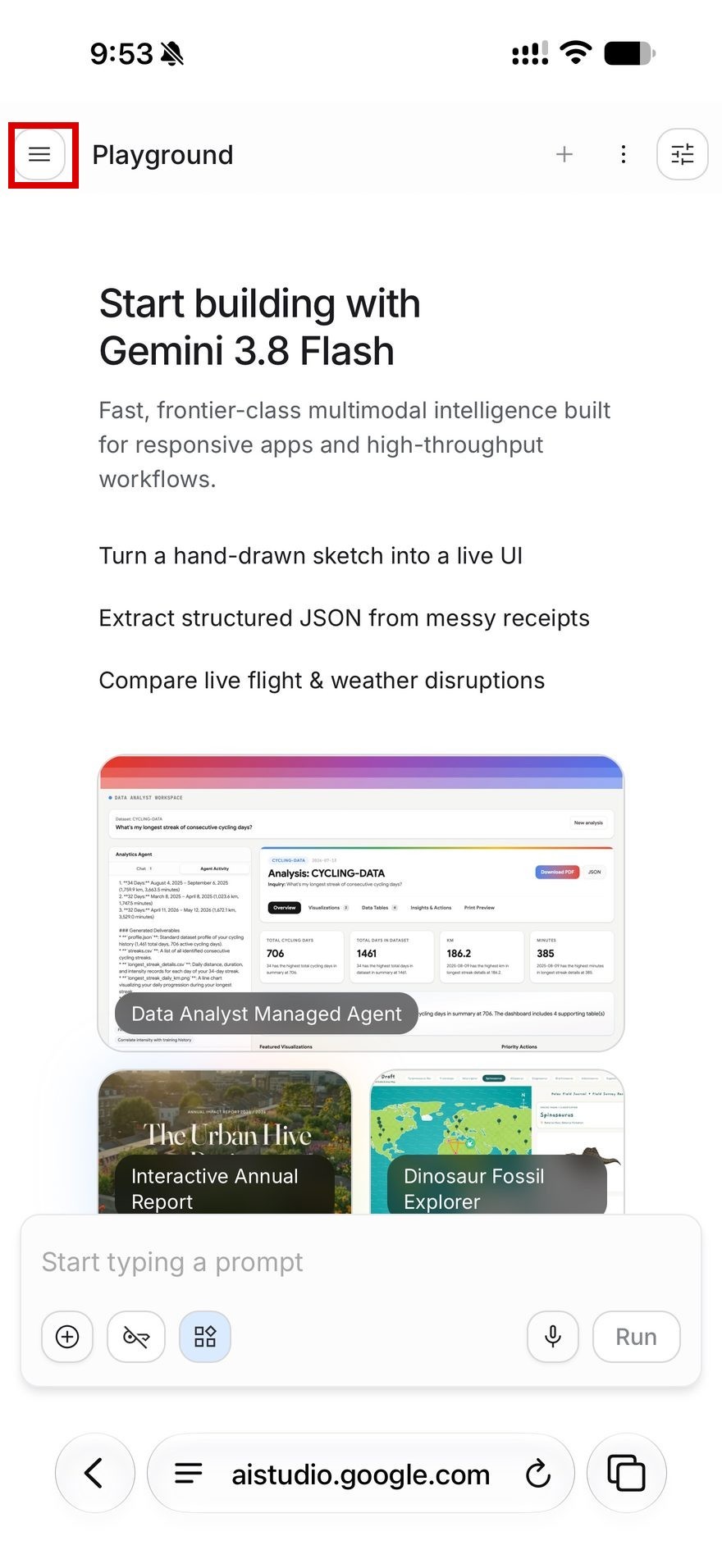
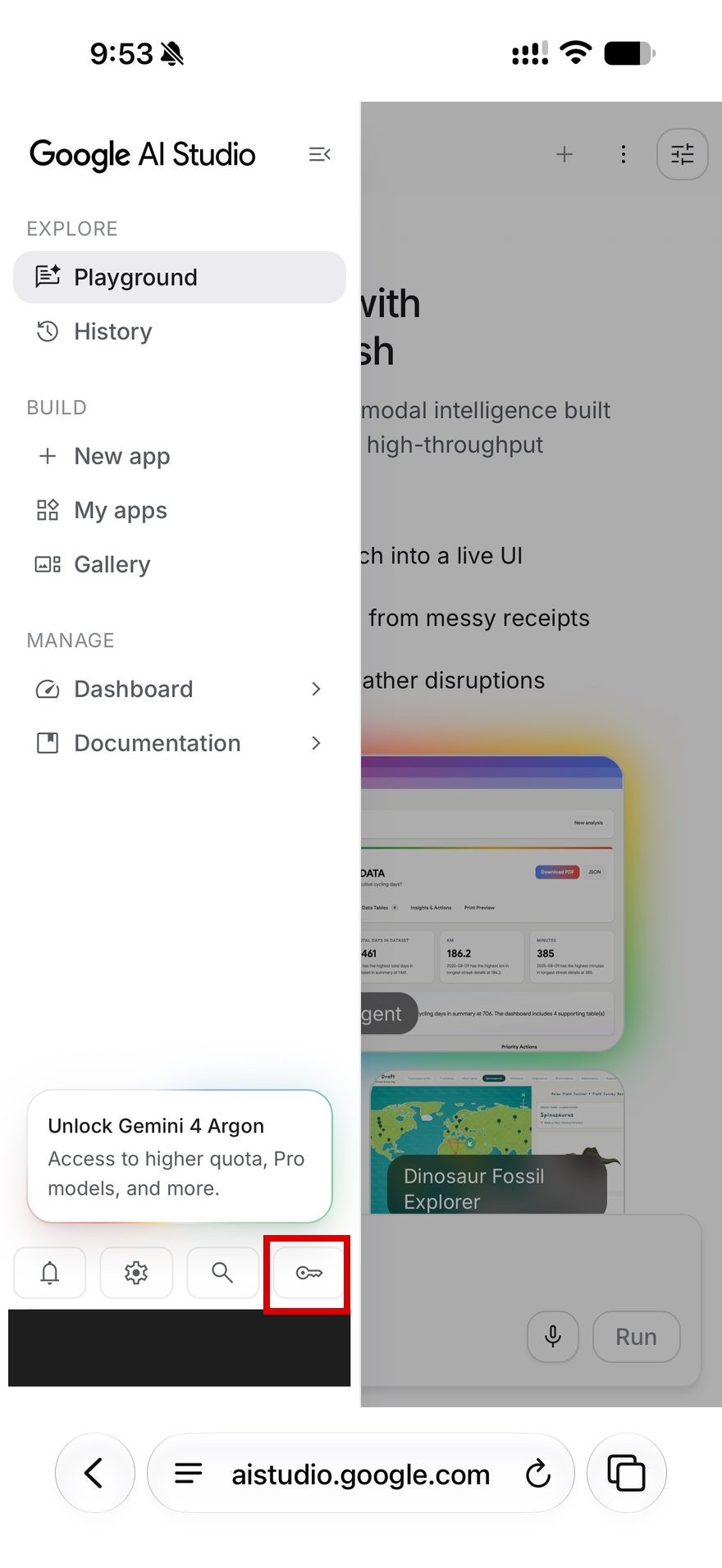
انٹرفیس مختلف ہو تو API keys کا صفحہ براہ راست کھولیں۔ آپ کو اپنی کی بنانے یا موجودہ کی دیکھنے کا اختیار ملنا چاہیے۔
3۔ اپنی Gemini API کی بنائیں
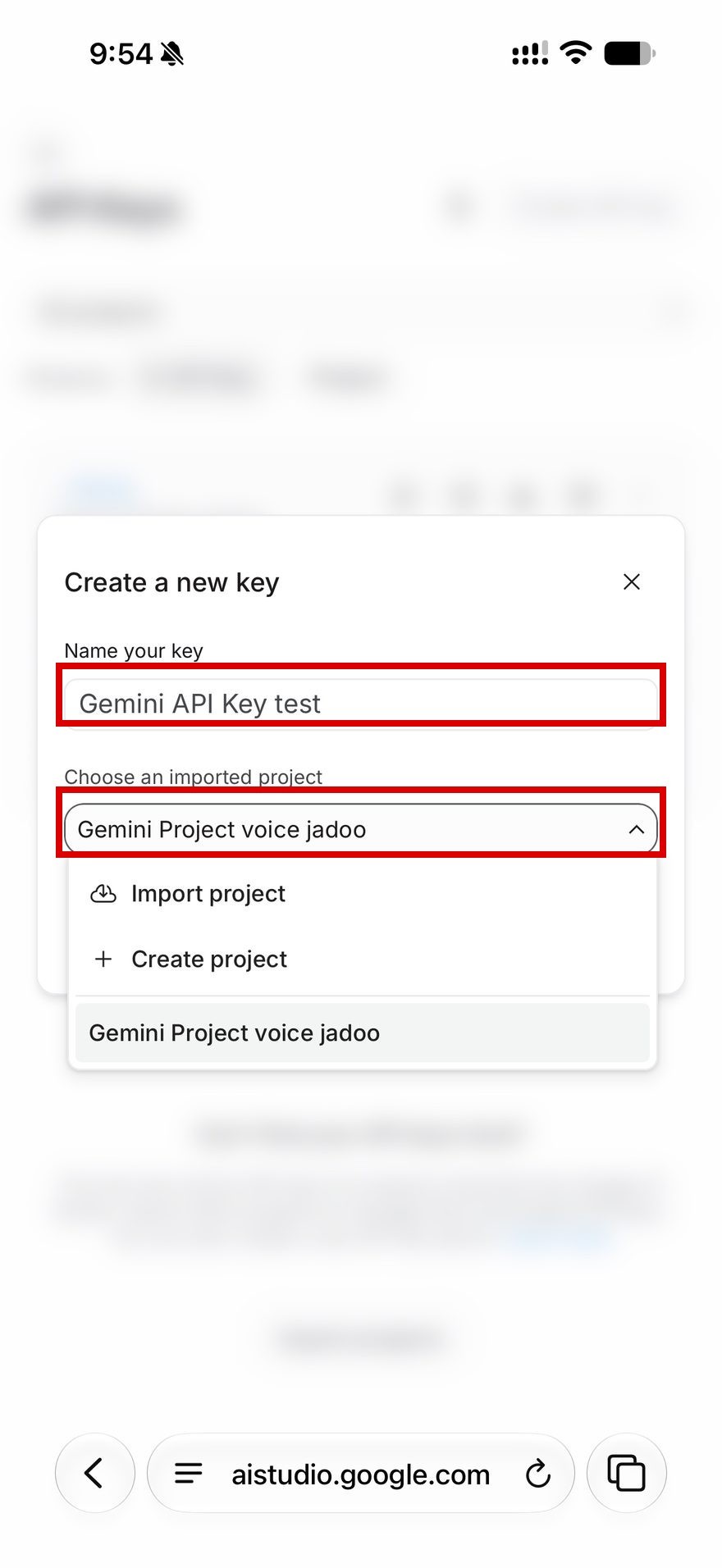
API کی وہ خفیہ کوڈ ہے جس سے ایپ آپ کے گوگل پروجیکٹ کے تحت آواز بنانے کی درخواست بھیجتی ہے۔ API keys کے صفحے پر Create API key دبائیں۔ کھلنے والے Create a new key خانے میں نام رکھیں، مثلاً Jadoo Voice Personal۔
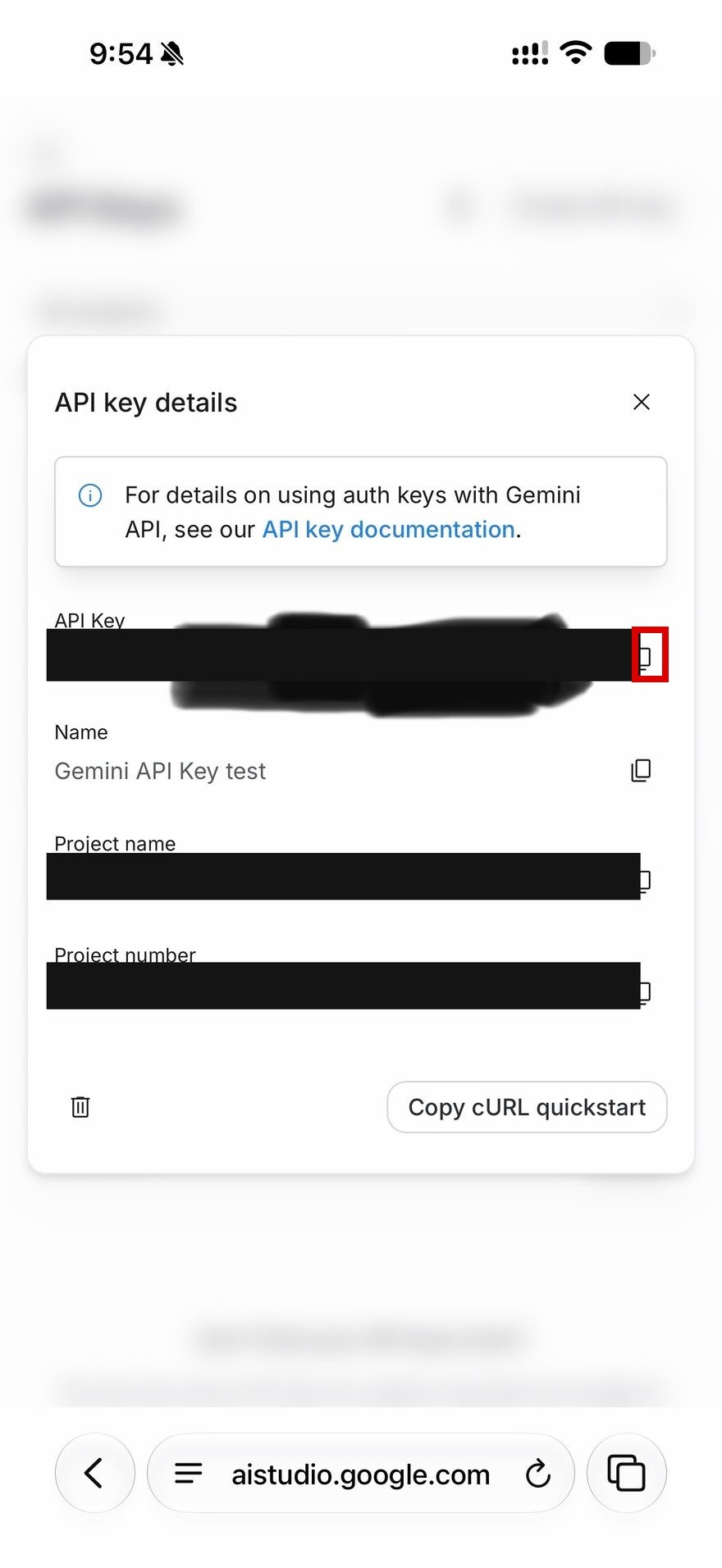
پروجیکٹ کے انتخاب میں اپنا موجودہ پروجیکٹ چنیں۔ ضرورت ہو تو دکھائی دینے والا Create project یا Import project اختیار استعمال کریں۔ کی بن جائے تو اس کے ساتھ Copy آئیکن دبائیں۔ نئے اکاؤنٹ میں گوگل پہلے سے پروجیکٹ اور کی بھی دے سکتا ہے۔ مزید تفصیل گوگل کی API کی گائیڈ میں ہے۔
4۔ جادو وائس میں کی لگائیں اور آزمائیں
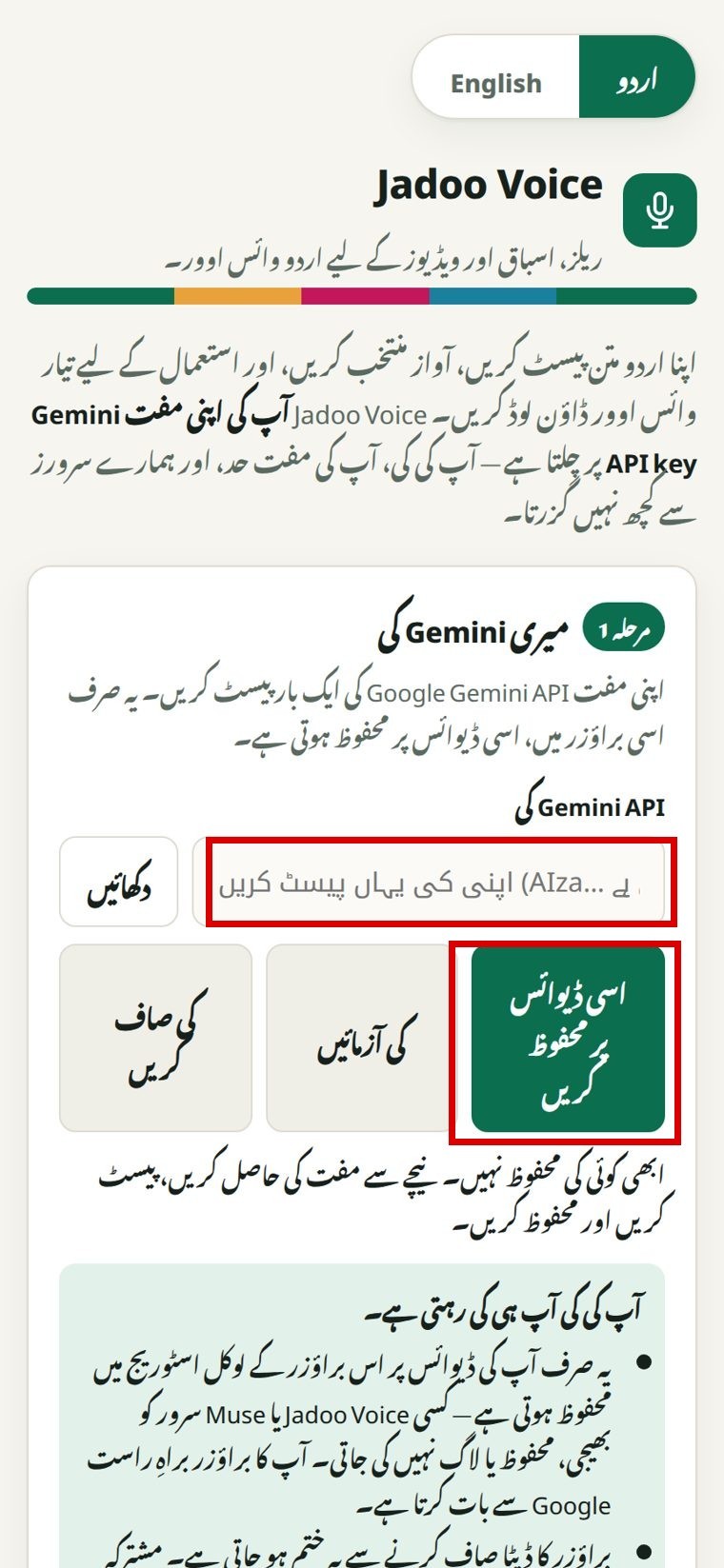
میوز یا جیمنائی کینوس میں اپنی بنائی ہوئی جادو وائس ایپ پر واپس آئیں۔ پہلے حصے میں کی کے خانے، مثلاً «میری Gemini کی»، میں کاپی کیا ہوا کوڈ پیسٹ کریں۔ «کی آزمائیں» دبائیں، پھر اگلے مرحلے کا مختصر نمونہ بنا کر آڈیو جانچیں۔
اپنے ذاتی آلے پر کی محفوظ رکھنا چاہیں اور «اسی ڈیوائس پر محفوظ کریں» کا اختیار دستیاب ہو تو اسے منتخب کریں۔ یہ اختیاری ہے؛ اسے چنے بغیر کی موجودہ سیشن تک رہنی چاہیے۔ ایپ دوبارہ کھولنے پر کی محفوظ نہ ملے تو دوبارہ درج کریں۔ محفوظ رہنے کا طریقہ پلیٹ فارم اور براؤزر پر منحصر ہے۔
کی کو پاس ورڈ کی طرح رکھیں۔ اسے صرف اپنی بنائی یا بھروسے کی ایپ میں ڈالیں۔ آڈیو بناتے وقت آپ کا متن اور کی گوگل کی API کو بھیجے جاتے ہیں؛ «کی براؤزر میں محفوظ ہے» کا مطلب یہ نہیں کہ وہ کبھی آلے سے باہر نہیں جاتی۔ مشترکہ کمپیوٹر پر اسے محفوظ نہ کریں۔ «کی صاف کریں» مقامی کاپی ہٹاتا ہے؛ افشا ہونے والی کی کو گوگل اے آئی اسٹوڈیو میں بھی منسوخ کریں۔
5۔ پہلے مختصر اردو متن لکھیں
متن کے خانے میں یہ نمونہ ڈالیں:
السلام علیکم! آج ہم اردو میں اپنا پہلا وائس اوور بنا رہے ہیں۔ پہلے ایک چھوٹا سا متن آزمائیں، پھر آواز سن کر اگلا قدم اٹھائیں۔
صرف وہ الفاظ لکھیں جو آواز میں سنانا چاہتے ہیں۔ «پُرسکون انداز میں پڑھیں» جیسی ہدایات اگلے مرحلے کے انداز والے خانے میں دیں۔ جملے مختصر رکھیں اور جہاں وقفہ چاہیے، وہاں مناسب اوقاف لگائیں۔ نام، فون نمبر اور قیمتیں لکھنے کے بعد خاص طور پر سن کر جانچیں۔
اردو کی جانچ ضروری ہے: گوگل کے موجودہ 3.8 TTS زبانوں کے جدول میں اردو نام سے درج نہیں ملی، جبکہ پرانے دستاویزی نسخوں میں اردو موجود تھی۔ اس لیے نئے ماڈل پر پاکستانی اردو کے درست تلفظ کی ضمانت نہیں دی جا سکتی۔ پہلے یہی نمونہ سنیں؛ نتیجہ درست نہ ہو تو پورا اسکرپٹ بنانے سے پہلے ماڈل یا ایپ کی ترتیب درست کروائیں۔ موجودہ TTS دستاویزات
6۔ آواز اور پڑھنے کا انداز منتخب کریں
آوازوں کے کارڈز میں سے ایک نام چنیں، مثلاً Zephyr، Puck یا Kore۔ پہلے ایک ہی متن کو 2 آوازوں میں سنیں اور اپنی ضرورت کے مطابق انتخاب کریں۔ کارڈ پر لکھی عمر یا مزاج کی تفصیل ایپ کی رہنمائی ہے؛ اصل فیصلہ آواز سن کر کریں۔
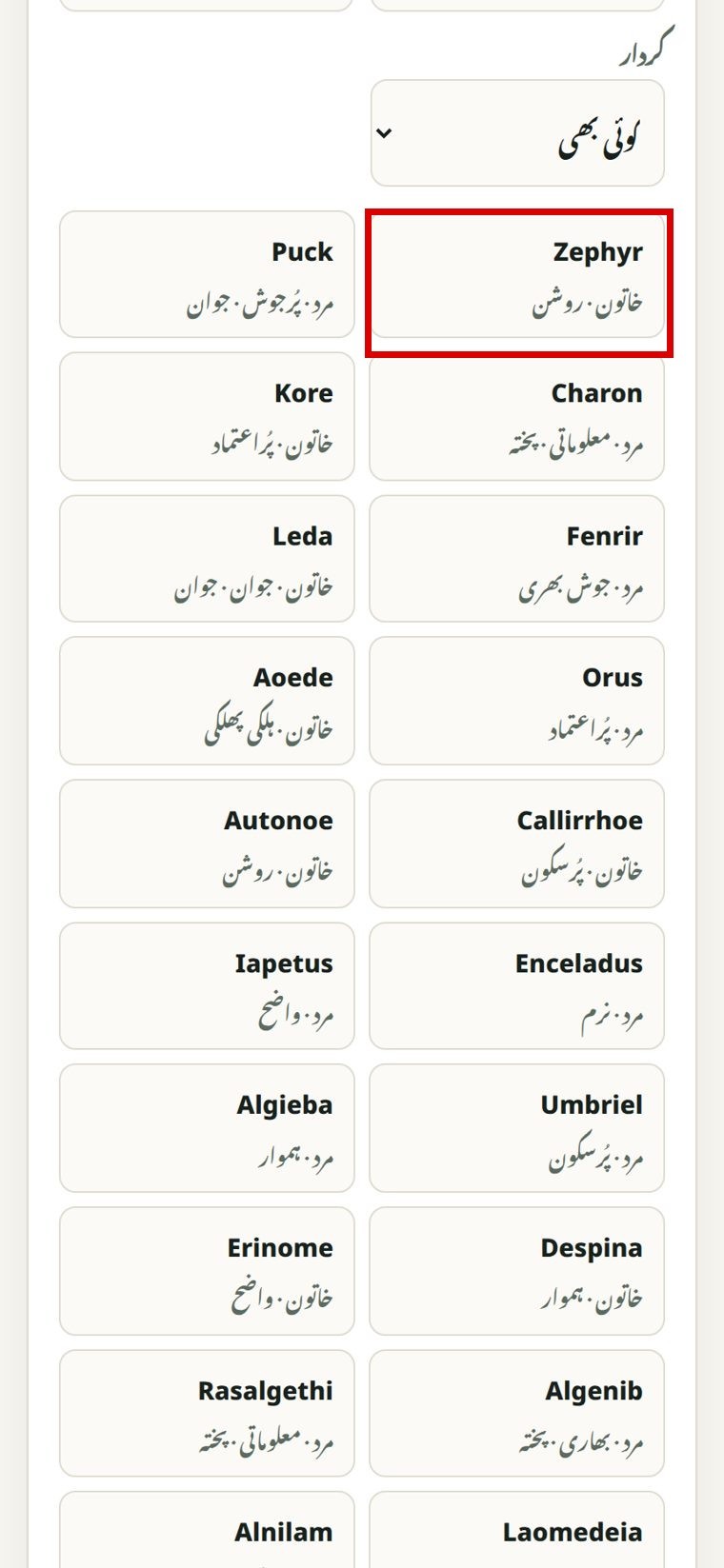
اس کے بعد Expression میں انداز، Pace میں رفتار اور Accent میں لہجہ طے کریں۔ پاکستانی اردو کا اختیار ہو تو اسے منتخب کریں۔ ابتدا میں عام رفتار اور پُرسکون انداز رکھیں۔ اضافی ہدایت کے خانے میں یہ لکھ سکتے ہیں:
پاکستانی اردو میں، دوستانہ اور پُرسکون انداز سے پڑھیں۔ رفتار معتدل ہو۔ ہر مکمل جملے کے بعد ہلکا وقفہ دیں۔ صرف دیا گیا متن پڑھیں۔
آواز پسند آ جائے تو اس کا نام اور یہ ہدایات محفوظ رکھیں۔ اگلی ریل یا سبق میں انہی سے آغاز کریں؛ پوری سیریز میں آواز بدلنے سے بچیں۔
7۔ آواز بنائیں، پھر پورا نتیجہ سنیں
آواز بنانے کا بٹن دبائیں اور پراسیسنگ مکمل ہونے دیں۔ لمبا متن ہو تو ایپ اسے حصوں میں بنا سکتی ہے۔ دورانِ کام بٹن بار بار نہ دبائیں۔ آڈیو پلیئر آئے تو متن کے ساتھ شروع سے آخر تک سنیں۔
- کوئی جملہ رہ گیا ہو تو اس حصے کو دوبارہ بنائیں۔
- لفظ غلط بولا گیا ہو تو اس کا املا یا جملے کی ساخت آسان کریں۔
- حصوں کے درمیان آواز بدل رہی ہو تو چھوٹا اسکرپٹ، ایک ہی آواز اور یکساں انداز آزمائیں۔
- آخری جملہ کٹا ہو تو اس فائل کو استعمال نہ کریں؛ دوبارہ بنائیں یا ایپ کی خرابی درست کروائیں۔
الفاظ کی تعداد سے وقت کا صرف اندازہ لگ سکتا ہے۔ حتمی دورانیہ بننے والی آڈیو کے پلیئر میں دیکھیں۔
8۔ WAV یا MP3 فائل ڈاؤن لوڈ کریں
ایڈیٹنگ کے لیے Download WAV چنیں۔ فون پر سننے یا بھیجنے کے لیے MP3 کا اختیار دستیاب ہو تو اسے استعمال کریں؛ عموماً فائل چھوٹی ہوتی ہے۔ ڈاؤن لوڈ کے بعد فائل الگ پلیئر میں کھول کر آخری چند سیکنڈ بھی سنیں۔
آئی فون: ڈاؤن لوڈ یا شیئر کا بٹن دبائیں۔ شیئر شیٹ میں Save to Files چنیں، فولڈر منتخب کریں اور Save دبائیں۔ فائل Files ایپ میں کھولیں۔
اینڈرائیڈ: ڈاؤن لوڈ کے بعد براؤزر کے Downloads یا فون کی Files ایپ میں جائیں۔ فائل کا نام اور سائز دیکھیں، پھر اسے چلا کر جانچیں۔
میک یا ونڈوز: فائل عموماً Downloads میں ملتی ہے۔ آڈیو نئی ٹیب میں کھلے تو براؤزر کا Save As اختیار استعمال کریں؛ میک پر Cmd + S اور ونڈوز پر Ctrl + S بھی آزما سکتے ہیں۔
9۔ واٹس ایپ پر اصل آڈیو فائل بھیجیں
Share یا Share to WhatsApp دکھائی دے تو اسے دبائیں، واٹس ایپ منتخب کریں، مطلوبہ چیٹ چنیں اور فائل بھیجنے سے پہلے نام دیکھ لیں۔ اس میں اصل آڈیو فائل جانی چاہیے، صرف ایپ کا لنک نہیں۔
فائل شیئر کرنے کا اختیار براؤزر میں کام نہ کرے تو پہلے آڈیو ڈاؤن لوڈ کریں۔ پھر واٹس ایپ چیٹ میں اٹیچمنٹ سے محفوظ فائل منتخب کریں۔ وصول کرنے والے کو آپ کی Gemini کی نہیں چاہیے؛ وہ عام آڈیو فائل کی طرح اسے سن سکتا ہے۔
10۔ آواز کے ساتھ اردو کیپشنز والی ویڈیو محفوظ کریں
جیمنائی والے پرامپٹ میں یہ فیچر آڈیو بننے کے بعد کھلتا ہے۔ پہلے مختصر آڈیو بنائیں اور پوری سن لیں۔ پھر نتیجے کے حصے میں ویڈیو کے اختیار کو کھولیں:
- ابتدا میں 720 × 1280 اور 24fps منتخب کریں۔ بڑے سائز کی ضرورت ہو تو 1080 × 1920 اور 30fps کا اختیار پرامپٹ میں موجود ہے۔
- پہلے پیش منظر چلائیں۔ اردو الفاظ جڑے ہوئے، دائیں سے بائیں اور مکمل نظر آنے چاہییں۔
- ویڈیو بنانے کا بٹن دبائیں اور براؤزر کی ٹیب کھلی رکھیں۔ اس طریقے میں ریکارڈنگ تقریباً آڈیو جتنا وقت لیتی ہے؛ 30 سیکنڈ کی آواز سے ویڈیو فوراً بننے کی توقع نہ رکھیں۔
- فائل محفوظ کرکے اسے فون یا کمپیوٹر کے عام ویڈیو پلیئر میں کھولیں۔ شروع، درمیان اور آخر میں آواز سنیں، آخری جملہ پورا ہونے اور کیپشنز کی ترتیب کو جانچیں۔
الفاظ کی ٹائمنگ اندازے سے بنتی ہے؛ لمبی آڈیو میں لفظ آواز سے آگے یا پیچھے ہو سکتا ہے۔ ایپ MP4 صرف تب دے جب براؤزر اسے ریکارڈ کر سکے، ورنہ WebM مل سکتی ہے۔ گوگل کا TTS ماڈل آواز بناتا ہے؛ کیپشن ویڈیو آپ کی بنائی ہوئی ایپ براؤزر میں تیار کرتی ہے۔ ویڈیو فارمیٹ کی براؤزر سپورٹ
ویڈیو خاموش ہو یا ایکسپورٹ نہ چلے تو درست WAV محفوظ رکھیں۔ جیمنائی کو خرابی بتائیں یا اسی آڈیو کو اپنے ویڈیو ایڈیٹر میں استعمال کریں۔ میوز کی ایپ میں ویڈیو کا اختیاری فیچر شامل ہو تو اس کا نتیجہ بھی اسی طرح جانچیں۔
کتنا استعمال مفت ہے؟
25 اکتوبر 2026 کو گوگل کی قیمتوں کی فہرست میں Gemini 3.8 Flash TTS اور Flash-Lite TTS کے لیے مفت درجے میں محدود استعمال موجود ہے۔ اس سے روزانہ لامحدود آوازیں بنانے کا وعدہ نہیں ہوتا۔ ایپ بنانے والے پلیٹ فارم کی فیس الگ ہو سکتی ہے۔ جیمنائی ایپ کا سبسکرپشن اور آپ کی API کی والے پروجیکٹ کا استعمال الگ ہیں؛ ایک کو دوسرے میں شامل نہ سمجھیں۔
اپنے پروجیکٹ کے Rate limits صفحے پر اصل حد دیکھیں۔ گوگل درخواستوں کی فی منٹ، ٹوکنز کی فی منٹ اور درخواستوں کی یومیہ حد لگاتا ہے۔ یہ حد پروجیکٹ کی ہوتی ہے؛ اسی پروجیکٹ کی نئی کی بنانے سے دوگنی نہیں ہوتی۔ روزانہ کی گنتی Pacific وقت کی آدھی رات پر ری سیٹ ہوتی ہے۔ گوگل کی شرحِ استعمال کی حدود
مثلاً ایپ اسکرپٹ کو 5 حصوں میں بنائے تو ایک وائس اوور کئی درخواستیں استعمال کرے گا۔ پہلے چھوٹا نمونہ آزمائیں، پھر مکمل متن چلائیں۔ مفت درجے میں مواد گوگل کی مصنوعات بہتر بنانے کے لیے استعمال ہو سکتا ہے؛ ذاتی یا کاروباری خفیہ متن ڈالنے سے پہلے اپنے منتخب درجے کی شرائط دیکھیں۔
کوئی مسئلہ آئے تو یہ کریں
| مسئلہ | اگلا قدم |
|---|---|
| کی قبول نہیں ہو رہی | پوری کی دوبارہ پیسٹ کریں۔ غلطی کے پیغام میں پروجیکٹ، اجازت یا پابندی کا ذکر بھی دیکھیں؛ ہر خرابی کی وجہ غلط کی نہیں ہوتی۔ |
404 یا model not found | ماڈل کا درست نام اور اکاؤنٹ کی رسائی جانچیں۔ پرانی ایپ ہو تو ایجنٹ سے مکمل TTS انٹیگریشن اپڈیٹ کروائیں۔ |
429 یا limit reached | اپنی حد دیکھیں۔ فی منٹ کی حد ہو تو وقفہ دیں؛ یومیہ حد ہو تو ری سیٹ ہونے کا انتظار کریں۔ بار بار بٹن نہ دبائیں۔ |
| آڈیو نہیں بنی یا درخواست رد ہوئی | غیر ضروری ہدایات متن سے ہٹائیں، مختصر جائز نمونہ آزمائیں اور اصل پیغام پڑھیں۔ |
| MP3 خراب ہے | درست چلنے والی WAV محفوظ کریں۔ MP3 بنانے کی خرابی ایپ بنانے والے ایجنٹ کو بتائیں۔ |
| ویڈیو میں آواز نہیں | ویڈیو استعمال نہ کریں۔ الگ آڈیو ڈاؤن لوڈ کرکے ایڈیٹر میں لگائیں۔ |
اس سے کیا کام لیں؟
استاد ایک مختصر سبق کی آواز بنا کر طلبہ کو بھیج سکتا ہے۔ چھوٹا کاروبار اوقاتِ کار یا نئی سروس کا اعلان تیار کر سکتا ہے۔ مواد بنانے والا اپنی ریل کی ویڈیو پہلے ایڈٹ کرکے مناسب دورانیے کا وائس اوور اس کے نیچے لگا سکتا ہے۔
آج کے لیے ایک کام منتخب کریں: 3 جملوں کا اعلان لکھیں، آواز بنائیں، پوری فائل سنیں اور اسے اپنے فون میں محفوظ کریں۔ یہ مرحلہ درست ہو جائے تو اسی آواز اور انداز سے اپنا اگلا سبق یا ویڈیو تیار کریں۔
میوز کا مکمل ماسٹر پرامپٹ کھولیں
Build a working personal Jadoo Voice artifact for Urdu voiceovers inside my own Muse app. Each reader creates and runs their own artifact in their own Muse account with their own Gemini API key. This is an implementation brief adapted from the supplied Jadoo Voice guide, updated 25 October 2026. Deliver the working artifact and source inside Muse, with instructions to open and reuse it there. A separate hosted website, public app URL or deployment is not part of this task. Do not ask for my secret key in chat; I will enter it in the finished app.

1. Verify the integration before coding
Read the current official documentation:
https://ai.google.dev/gemini-api/docs/speech-generation
https://ai.google.dev/gemini-api/docs/generate-content/speech-generation
https://ai.google.dev/gemini-api/docs/api-key
https://ai.google.dev/gemini-api/docs/pricing
https://ai.google.dev/gemini-api/docs/rate-limits
https://ai.google.dev/gemini-api/docs/deprecations
Use a currently supported TTS model and its matching API schema. At this review date, gemini-3.8-flash-tts is a current model; gemini-3.8-flash-lite-tts is an optional explicit alternative. Do not silently switch models or enable paid billing. The old guide used gemini-2.5-flash-preview-tts, which has a listed earliest shutdown date of 17 November 2026. Migrating requires checking the request format and response audio format, not just changing a string.
The current 3.8 language table does not explicitly list Urdu. Do not promise official Urdu support or perfect Pakistani pronunciation. Include a short Urdu audition and ask the user to judge it before making longer recordings. Report observed results separately from documentation claims.

2. Personal BYOK architecture and truthful privacy
Make a client-side artifact in Muse using the user's own Gemini API key, with calls to Google's documented API over HTTPS through a route actually supported by the artifact runtime. Verify network access, storage, playback and file export inside Muse. If the runtime blocks a required operation, explain which one and ask before changing the architecture or routing credentials through any additional service. Do not silently turn this into an externally hosted app.
Keep the key in memory by default. Offer an explicit opt-in "اسی ڈیوائس پر محفوظ کریں" choice only if persistent local storage is supported inside this Muse artifact. Do not assume persistence across sessions or devices; test it and state its scope. Otherwise keep the key only for the current session and explain that it must be entered again. Include masked key input, deliberate reveal/hide, "کی آزمائیں", and "کی صاف کریں". Keep secrets out of URLs, logs, analytics, screenshots, source files, exports and error reports. Never insert a shared developer key into a public app. State plainly that the key and submitted script are sent to Google to generate audio. Clear key removes the local copy; it does not revoke the Google credential. Saving in localStorage is a convenience, not a security guarantee. Show a link to Google key management. Do not build a shared service or distribute a developer key; every user supplies their own key in their own artifact.

3. Urdu-first, accessible interface
Default Urdu with proper RTL and readable Noto Nastaliq Urdu, plus an English toggle. Persist language separately from credentials; toggling must retain the current script, selected voice and style. Keep English product names, voice IDs and model IDs in isolated LTR spans. Use English digits 0-9. Use کی for API key and آفیشل for official. Proofread all Urdu labels, help and errors, including واضح and سیکھنے. Avoid clipped Nastaliq descenders and overcrowded controls. Use semantic labels, keyboard focus, large touch targets and a responsive 375px layout.
Create a professional deep green, sand and gold design. Exact top-right brand wordmark: Urdu Ai, Montserrat SemiBold, Urdu white, Ai #FFBE0B, lowercase i, transparent with no box. App name: Jadoo Voice. Use numbered sections: key, text, voice/style, generation, result. Do not fabricate provider logos.

4. Script, voices and direction
Provide a multiline Urdu script input, dir=auto, character count, and an explicitly rough duration estimate that updates to actual duration after generation. Never equate a fixed character count to guaranteed audio length. Warn before very long scripts and recommend a short audition.
Offer the provider's current valid prebuilt voices, including Zephyr, Puck and Kore where supported. Preserve exact IDs. Use actual provider metadata when available. If adding editorial gender, age-feel or character filters, label them as app descriptions rather than verified identities or official demographic facts. Provide Expression, Pace and Accent controls and a free-editable direction field. Default to a requested Pakistani Urdu delivery, not a guaranteed result. Keep delivery instructions separate from the spoken transcript using the chosen API's documented mechanism. Keep one selected voice and direction across chunks.

5. Generation and trustworthy progress
Use a short test first. Split longer scripts at sentence boundaries, targeting around 1,800 characters per chunk as an app choice, respecting the actual model limits. Do not split Urdu graphemes. Show chunk N of M, allow cancel, retain successful chunks locally, and avoid regenerating successful work unnecessarily. Use bounded retries with backoff only for transient failures. Do not retry authorization failures or exhausted daily quotas in a loop. Explain that chunks and retries may consume quota. Use real completed-chunk progress; show an indeterminate state for stages without measurable progress.
Parse the documented response MIME type and encoding. Never assume all models return raw PCM. Save valid WAV responses directly; if PCM is returned, use the documented rate/channel/bit depth to build a proper WAV. Decode compatible chunks, normalize their format when needed, concatenate audio samples and encode one valid output. Do not concatenate WAV headers. Check nonempty audio, container consistency and all expected chunks before offering the result. Container checks do not prove every word was spoken; prompt the user to listen to the complete recording.

6. Clear errors and costs
Translate actionable errors into Urdu and English. Explain HTTP 400 as a potentially invalid request, not always a bad key. For 401/403, check credential permissions or restrictions. For 404, check model/endpoint/access. For 429, distinguish available quota information and retry timing; link the user's AI Studio rate limits. Handle provider blocking, no audio, network issues and browser decoding failure without exposing credentials. Show only sanitized technical details for troubleshooting.
Do not claim unlimited free use or a fixed daily allowance. Show the current pricing and rate-limit links. State that the selected project/model controls quota and billing. A new key in the same project does not increase quota. Free-tier data terms and builder-platform charges may differ. Never enable billing without the user's explicit authorization.

7. Audio player, download and sharing
After generation show a prominent player, actual duration and file size. Offer Download WAV. Optionally encode MP3 in the browser, flush the encoder, then decode it and compare its duration to the source within max(1 second, 5%). If MP3 validation fails, retain the valid WAV and explain the MP3 issue. Do not present malformed or truncated output as ready.
Offer native file sharing only when navigator.canShare confirms support for the actual audio file. Share to WhatsApp may open the system share sheet; do not promise WhatsApp is installed. Fallback: download, then attach the file in WhatsApp. Never share the API key, app session data or a temporary blob URL as though it were a public audio download.
Provide contextual save help: iPhone share sheet > Save to Files; Android Downloads/Files; desktop download, or open audio and Save As if supported. Temporary browser blob URLs work only in their local context; do not label them as cross-device public links. Revoke them only after use. Verify that file suffix, MIME type and content agree.

8. Optional caption video, clearly experimental
Implement only after the audio workflow works. Offer Preview Video and Download Video, portrait 720x1280 at 24fps by default, with optional 1080x1920 at 30fps. Use proper shaped RTL Nastaliq, current word highlighted and nearby words faded, a context line, audio-reactive waveform, timer and the exact Urdu Ai wordmark.
Word timing may be estimated from the final recording length; explicitly label it estimated, not aligned transcription. Keep all timings within the audio duration. Long scripts can drift. Cache static layers. Choose an available codec/container combination; prefer MP4 with AAC when supported, otherwise show the actual WebM or supported format. Do not rename WebM as MP4. Use feature detection for WebCodecs and recording fallbacks; explain slower foreground rendering when needed. Do not promise faster-than-real-time export.
Verify that the exported video has an audio track, decodes and has non-silent samples across representative segments. Ask the user to listen as well; signal detection is not a substitute for listening. If the output is silent, retry once with a supported recording route; if that fails, show a clear error and retain downloadable audio. Never offer a silent video as successfully complete. Report actual file size after encoding; avoid fixed compression promises.

9. Acceptance checks and handover
Test short Urdu speech, a multi-chunk script, proper final sentence, one consistent voice, language toggle without data loss, save/clear credential behavior, no secret in network destinations except Google authentication, invalid request handling, quota handling, audio playback, WAV download, MP3 fallback and mobile layout. Test exported video with sound if implemented. Test actual file sharing on a supported device; mark untested devices honestly.
Use this audition script: السلام علیکم! آج ہم اردو میں اپنا پہلا وائس اوور بنا رہے ہیں۔ پہلے ایک چھوٹا سا متن آزمائیں، پھر آواز سن کر اگلا قدم اٹھائیں۔
Provide a concise test report distinguishing real tests, mocked tests and checks still requiring the user's key/device. If credentials are unavailable, finish the app and test the non-network parts, but do not invent successful speech generation. Deliver the artifact in Muse, its source, dependency versions, steps to reopen it inside Muse, privacy data flow, and known runtime limitations. Do not deploy or publish an external website.
جیمنائی کینوس کا مکمل پرامپٹ کھولیں
Build a single-file HTML/CSS/JS web app named jadoo_voice.html in Google Gemini Canvas: Jadoo Voice (جادو وائس — ذاتی اردو وائس اوور اسٹوڈیو). It creates personal Urdu voiceovers with the user's own Gemini API key (BYOK), plus an experimental portrait caption-video export. Deliver the app in Canvas with its source. Keep core app code in this one file; disclose optional external fonts and MP3 library dependencies. No external backend, proxy server, shared cloud database, or hardcoded developer key. Never ask for my API key in chat; I will enter it only in Section 1 of the finished app.

Verify the current documentation before implementing. These instructions were reviewed on 25 October 2026:
https://ai.google.dev/gemini-api/docs/generate-content/speech-generation
https://ai.google.dev/gemini-api/docs/speech-generation
https://ai.google.dev/gemini-api/docs/api-key
https://ai.google.dev/gemini-api/docs/pricing
https://ai.google.dev/gemini-api/docs/rate-limits
https://ai.google.dev/gemini-api/docs/deprecations
https://support.google.com/gemini/answer/16047321

1. Canvas runtime and model integration
Build and preview the app inside my own Canvas conversation. Test whether this preview supports direct Google API requests, local storage, playback, downloads, canvas captureStream, MediaRecorder and file sharing. Do not promise that every Canvas iframe or mobile browser supports them. If the runtime blocks an operation, name the blocked operation and keep working features available. Do not silently introduce a backend or proxy. If a downloaded local HTML copy is a useful fallback, explain its browser requirements and ask before changing the requested workflow.
Default model: gemini-3.8-flash-tts. Offer gemini-3.8-flash-lite-tts as an explicit alternative. Do not silently change models or enable paid billing. Explain in a small model-info section that gemini-2.5-flash-preview-tts has a listed earliest shutdown date of 17 November 2026, not a guaranteed final shutdown date.
This brief uses the documented generateContent REST route. Do not mix its schema with the separate Interactions API schema. POST to https://generativelanguage.googleapis.com/v1beta/models/{model}:generateContent with Content-Type: application/json and x-goog-api-key: <USER_KEY> in headers. Never put the key in a URL query string.
Send the spoken Urdu transcript in contents[0].parts[0].text and sustained delivery directions separately in contents[0].parts[0].speech_metadata.style. Include role: "user". Set generationConfig to {"responseModalities":["AUDIO"],"speechConfig":{"voiceConfig":{"voice":"<VoiceID>"}}}. For these 3.8 models, plain text is treated as a verbatim transcript; do not put stage directions into it. Support documented optional inline vocal/pause tags: <short pause>, <long pause>, <breath>, <sigh>, <laugh>. Keep tags intact during chunking and omit them from captions and spoken-word duration estimates.

2. Short Urdu audition
State that the reviewed Flash TTS language table covers over 130 languages but does not explicitly list Urdu; Flash-Lite has a different coverage table. Requested Pakistani Urdu pronunciation is not a guarantee. Preload this exact short script and invite the user to judge the result before generating a longer recording:
السلام علیکم! آج ہم اردو میں اپنا پہلا وائس اوور بنا رہے ہیں۔ پہلے ایک چھوٹا سا متن آزمائیں، پھر آواز سن کر اگلا قدم اٹھائیں۔
Do not claim that a metadata/key test proves Urdu synthesis works. Real speech generation and listening are separate acceptance checks.

3. Key controls, storage and privacy
Keep the key in memory by default. Probe localStorage with a temporary write/read/remove inside try/catch. Only if supported, enable an explicit opt-in checkbox: اسی ڈیوائس پر محفوظ کریں (Save on this device). Explain that this uses the current browser/iframe origin, not cross-device synchronization or hardware protection. If storage later fails, handle the error and use memory only. Turning the opt-in off must remove the saved key. Language preference is stored separately.
Use a masked password input, autocomplete="off", deliberate Reveal/Hide buttons (کی دکھائیں / کی چھپائیں), Test Key (کی آزمائیں), and Clear Key (کی صاف کریں). Test Key may call GET https://generativelanguage.googleapis.com/v1beta/models/{model} with x-goog-api-key. Label success as model metadata/access checked, not proof of TTS quota, billing eligibility or successful generation. Let the user run the short audition separately. Clear Key wipes the input, memory and persisted app key; it does not revoke the key in Google Cloud. Cancel pending requests when clearing credentials.
Redact the active key value and AIza... credential patterns from errors, request previews and troubleshooting logs using [REDACTED_API_KEY]. Never include secrets in source files, exported HTML, shared app data, audio/video exports, analytics or console logs. Do not turn a secret into a default input value. The key and submitted script go directly to Google's generativelanguage.googleapis.com for audio generation. Quota and billing belong to the Google Cloud project; creating another key in the same project does not add quota. Do not enable billing automatically.
Provide links to key management, project limits, pricing and data terms:
https://aistudio.google.com/app/apikey
https://aistudio.google.com/app/plan_information
https://ai.google.dev/gemini-api/docs/api-key
https://ai.google.dev/gemini-api/docs/pricing
https://ai.google.dev/gemini-api/docs/rate-limits
Before sharing an app, clear credentials and ensure no entered key or private script is embedded in source or shared data. Sharing the build prompt is the simplest way for another person to create their own copy.

4. Urdu-first interface and branding
Default lang="ur" dir="rtl". Load Noto Nastaliq Urdu non-blocking with generous line-height of at least 2.15 and vertical padding; never clip descenders. Provide an English UI / اردو انٹرفیس toggle. Preserve the script, model, voice, editable style and generated audio when changing language; persist the language preference separately from credentials.
Isolate English names, model IDs, voice IDs and numbers with dir="ltr" and unicode-bidi:isolate. Use English digits 0-9. Use کی for API key and آفیشل for official. Proofread all Urdu labels, including واضح and سیکھنے.
Use deep green #07231C and #0D352B, warm sand #F7F2E7, and gold #FFBE0B. Place the exact Urdu Ai wordmark at the physical top-right of the header: Montserrat SemiBold, font-weight 600, Urdu white #FFFFFF, Ai gold #FFBE0B, lowercase i, transparent background, no box or border.
Organize 5 numbered sections: 1 Key & Privacy; 2 Script & Audition; 3 Voice, Model & Style Direction; 4 Generation & Progress; 5 Result Player, Download & Experimental Caption Video. Include visible keyboard focus, semantic labels, 44px+ touch targets and no horizontal overflow at 375px width. Long IDs must wrap. Do not block core controls on font or optional-library loading.

5. Script, voices and style
Provide a multiline textarea with dir="auto", live character count, Urdu grapheme count using Intl.Segmenter('ur', {granularity:'grapheme'}), chunk count and a clearly labeled rough duration estimate. After generation, show the actual decoded duration. Warn when the script exceeds about 1,800 characters or spans multiple chunks. If Intl.Segmenter is unavailable, use a proper grapheme-safe fallback or explain the limitation; never silently split Urdu combining sequences.
Offer the 30 documented prebuilt voices with exact IDs and descriptors: Kore Firm; Zephyr Bright; Puck Upbeat; Charon Informative; Sulafat Warm; Fenrir Excitable; Leda Youthful; Orus Firm; Aoede Breezy; Callirrhoe Easy-going; Autonoe Bright; Enceladus Breathy; Iapetus Clear; Umbriel Easy-going; Algieba Smooth; Despina Smooth; Erinome Clear; Algenib Gravelly; Rasalgethi Informative; Laomedeia Upbeat; Achernar Soft; Alnilam Firm; Schedar Even; Gacrux Mature; Pulcherrima Forward; Achird Friendly; Zubenelgenubi Casual; Vindemiatrix Gentle; Sadachbia Lively; Sadaltager Knowledgeable. Verify these against the current docs. Offer an optional existing custom voice_... or voicekey_... input; do not imply this creates or clones a voice. Label demographic/filter groupings as editorial app descriptions, not official facts.
Expression, Pace and Requested Accent selectors should populate a free-editable speech_metadata.style field. Default to requested Pakistani Urdu delivery. Preserve deliberate user edits or ask before overwriting them. Include a collapsed sanitized JSON request preview.

6. Chunking, progress, cancellation and retries
Split at sentence boundaries (۔, ؟, !, ., ?, newline), targeting around 1,800 characters per chunk as an app choice rather than a model limit. Fall back to clause/word boundaries, then grapheme boundaries. Keep recognized angle-bracket tags intact. Use the same selected model, voice and style for all chunks.
Show Chunk N / M, completed-chunk progress and an indeterminate indicator while a request runs. Cancel via AbortController and retain completed chunks in an in-memory cache keyed by model, voice, style and chunkText. Reuse successful chunks rather than requesting them again. Explain that cache is limited to this page session; retries and requests already processed by Google may still consume quota even if the browser cancels or loses the response. Do not promise cancellation refunds or zero duplicate charges.
Retry at most 2 times with exponential backoff for transient network errors, 5xx or explicitly identified short-term rate limits. Respect Retry-After or structured retry metadata. Never loop on 400, 401/403, 404 or exhausted daily quota. If the quota category is unknown, show the error and limits link rather than guessing a reset time.

7. Audio assembly and honest checks
Read inlineData.mimeType and inspect the decoded bytes. Current unary 3.8 requests normally return a complete WAV. Do not add a second WAV header. If a single chunk is a valid WAV, preserve it. For headerless PCM, use the documented encoding, sample rate, channel count and endianness; only use 24kHz mono signed 16-bit little-endian when confirmed for the actual format. Do not infer PCM byte order from a generic MIME label alone.
Parse RIFF chunks correctly; do not assume every WAV has exactly a 44-byte header. Locate fmt and data chunks, honor padding and reject malformed data. For multiple chunks, decode and normalize to a consistent 24,000Hz mono 16-bit PCM stream, concatenate samples without container headers, then encode one WAV. Verify expected chunk count, valid container, plausible duration and non-silent amplitude. These checks do not prove every word was spoken: invite the user to listen to the whole recording and check the final sentence.
Show bilingual actionable errors for invalid requests (400, not always a bad key), credential permissions/restrictions (401/403), model/endpoint access (404), quota/rate limits (429), safety blocks, empty audio and network failures. For restrictions, link current Google key guidance rather than diagnosing every 403 as one policy change. Daily request limits reset at midnight Pacific Time where that quota applies; do not confuse them with short-term rate limits. Keep technical details sanitized.

8. Player, downloads and sharing
Show an audio controls player, actual duration and file size. Offer verified WAV download. Optionally load lamejs@1.2.1 non-blocking from cdn.jsdelivr.net for in-browser MP3 encoding. Flush the encoder; decode the completed MP3 and compare its duration with the source within max(1 second, 5%). If the library is unavailable or validation fails, retain WAV and explain the MP3 fallback. Optional fonts/library use needs internet even though app logic is in one file.
Enable native file sharing only if navigator.canShare({files:[wavFile]}) succeeds. Share the actual file, not a blob URL. Explain iPhone Save to Files, Android Downloads/Files, desktop saving, and downloading first then attaching the file in WhatsApp if native sharing is unavailable. Do not promise a particular app is installed. Revoke blob URLs only after playback/download use has finished.

9. Experimental portrait caption video
Unlock after valid audio exists. Label Experimental and Estimated Word Timing. This creates a typographic caption video from the recorded voice and script, not newly generated live-action footage. Estimate word timings from word length and punctuation within [0,audioDuration]; this is not aligned transcription. Strip non-spoken vocal tags from displayed words. Offer 720x1280 at 24fps by default and optional 1080x1920 at 30fps.
Wait for fonts before capture. Cache static layers. Render correctly shaped, connected RTL Nastaliq, highlight the current word in #FFBE0B, fade nearby words, show a context line, an audio-reactive waveform, English-digit timer and exact top-right Urdu Ai wordmark. Do not draw Urdu letters separately; preserve full-line shaping and bidi order when implementing highlighting, and visually check exported frames.
Use canvas.captureStream and a Web Audio MediaStreamDestination to combine video and audio tracks in MediaRecorder. Detect API and MIME/container support. Prefer MP4 only when supported; otherwise export the actual WebM format. Never rename WebM as MP4. Recording is approximately real time, not guaranteed faster than the audio; keep the tab active and handle interruption/cancellation. Do not require microphone access to capture already-generated audio.
Validate the final exported blob, not only the source audio: nonempty playable container, plausible duration, video dimensions and audio track. Where supported, decode its audio and check representative segments for non-silent samples. decodeAudioData may reject a video container or codec even when audio is present; decoding failure is not proof of silence. Use a supported media/demux-and-decode or playback-analysis route when available. If automatic verification cannot be completed, clearly label the export as requiring playback verification, retain the WAV, and ask the user to listen before using it; never claim it passed automatically. If audio is demonstrably silent or missing, retry once with a corrected gain/track route; if still invalid, reject the video as successful and preserve the audio. Always offer a player to check the saved result and final sentence.

10. Offline diagnostics and handover
Include a collapsed diagnostic drawer for simulated single-chunk WAV, simulated 3-chunk PCM assembly and simulated 400/403/404/429 errors without a key. Clearly label all simulated audio and results; they are not live Gemini synthesis. Also test cancel/resume caching, no repeated successful chunk requests, correct WAV headers, blocked storage, unavailable MP3 library, language toggle without data loss and 375px layout.
Report which tests were real, simulated or still require the user's key/device. Do not invent successful speech generation, Canvas network access, mobile exports or video audio checks. Deliver the Canvas app, its single-file source, optional dependency versions and instructions to reopen it. Complete non-network parts if no key is available. Never request the secret key in chat, publish a shared key or deploy an external service.
اس گائیڈ کے 6 اسکرین شاٹس فراہم کردہ جادو وائس پی ڈی ایف سے لیے گئے ہیں۔ بٹنوں کی جگہ ایپ کے ورژن کے ساتھ بدل سکتی ہے۔ جیمنائی کینوس کے مراحل گوگل کی آفیشل مدد سے شامل کیے گئے ہیں؛ نئی ایپ کی مکمل آڈیو اور ویڈیو جانچ قاری کے اپنے اکاؤنٹ اور براؤزر میں ہوگی۔ آخری جانچ: 25 اکتوبر 2026۔